Sleep Sanity
How to log night wakes without waking yourself up
Two taps in the dark, why the crying minutes matter, and how to backfill in the morning when you were too tired to touch the phone.
At 3am the goal is not a perfect record. The goal is to get the number down and get back to sleep. A log you can finish half asleep is worth far more than a careful one you stop making by night four.
Here is how to keep it to a few seconds.
Log it in two taps
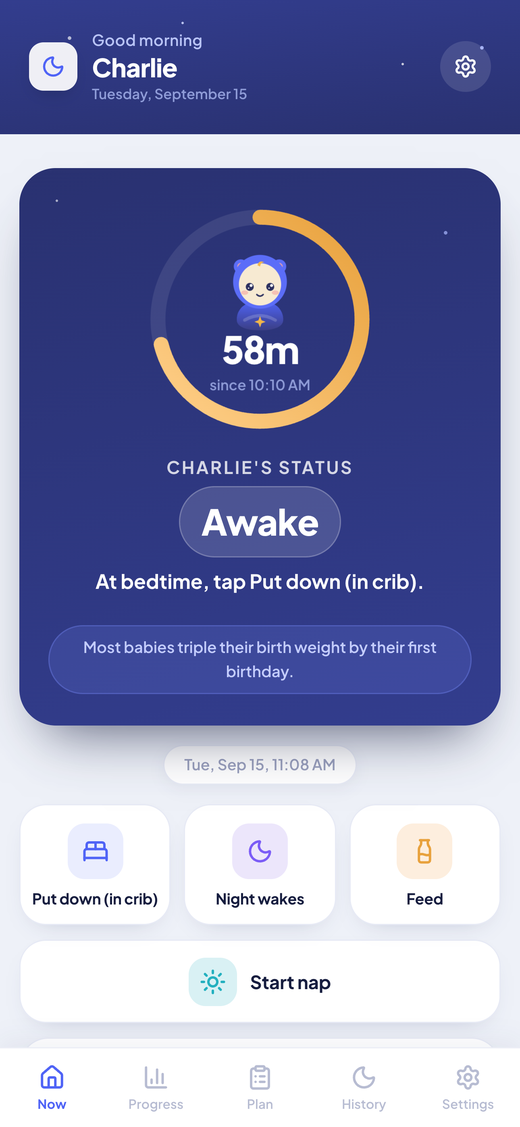
The Now screen keeps one big button for sleep and two smaller ones for Night wakes and Feed. Nothing is buried in a menu.
For a night wake, tap Night wakes, enter the minutes your baby cried, and tap Confirm. The time defaults to right now, so unless you are catching up on something earlier you never touch the date and time fields at all.
A few habits keep it short:
- Go to your baby first. Log afterwards, once you are back in bed.
- Keep the phone face down beside you, not on a charger across the room.
- Turn your screen brightness down before bed. A bright screen wakes you more than the tapping does.
- Do not write notes at 3am. If something mattered, it will still matter in the morning.
Why the crying minutes matter
The minutes field is the one number worth being roughly right about, and it is the one people most often skip.
A gentle, age-based plan works through timed check-ins. You put your baby down awake, you wait a set interval, you go in briefly, and the interval gets a little longer as the night goes on. What tells you whether those intervals suit your baby is how long they actually cry before settling, night after night.
Five minutes of grumbling and twenty five minutes of real crying feel about the same by morning. They are not the same night. Logged, the difference is a line you can read.
Crying minutes also feed the nightly sleep score, so a night with the field left blank scores better than it earned. That is worse than a missing night, because it quietly pulls the whole trend upward. What your sleep score means walks through the other four parts.
Backfilling in the morning
Some nights you will not touch the phone at all. That is fine, and it is what the day view is for.
Open History, tap the day, and every entry for that night appears in order: the night sleep block, then naps, feeds and wakes. At the bottom there is an add row with + Nap, + Wake and + Feed. Tap + Wake, set the time, enter the crying minutes, save.
Reconstruct rather than guess wildly:
- Work backwards from the things you do remember. The feed you gave, the time you saw on the clock, the moment you gave up and started the day.
- Round to the nearest five minutes. Nobody needs better than that.
- If you genuinely cannot tell whether there were two wakes or three, log two. Undercounting is easier to spot later than overcounting.
- Tap any existing row to edit it. Everything you log can be corrected or deleted afterwards.
A rough entry made over coffee is far more useful than a gap. Gaps are the one thing the charts cannot work around.
What the History icons mean
Each day in the History calendar carries small coloured markers, one for each kind of thing you logged that day.
- A blue moon means a night sleep was recorded.
- A purple sun and moon means at least one nap.
- An amber bottle means at least one feed.
- A pink wake marker means at least one night wake.
Four markers means a fully logged day. A day with a moon and no wake marker means you either had a straight night or you missed the wakes, and you will usually know which. Tap the day to check and fill it in.
The four mistakes people actually make
Logging a feed as a wake. A night feed is a feed. If your baby woke, cried, then fed, that is one wake and one feed, logged separately. Recording it only as a wake loses the feeding pattern. Recording it only as a feed hides the wake from the score.
Forgetting to confirm. Nothing is saved until you tap Confirm. Typing the minutes and then closing the panel or switching tabs leaves you with nothing. Wait for the confirmation line before you put the phone down.
Logging the time you finished instead of the time it started. Use the time your baby woke you. The crying minutes cover the rest.
Perfectionism. Two nights of exact records followed by five nights of nothing is worse than seven nights of approximate ones. The plan reads trends, not single entries.
Where to go next
Timing is the other half of this. Wake windows by age covers how long your baby can comfortably stay awake between sleeps, and the features page lists everything the app tracks. If you have not installed it yet, it is free on both stores.
Sources
Sleep Sanity is informational, not medical advice. Talk to your pediatrician before starting any sleep-training approach.
More from Learn
Daylight saving time and your baby's sleep: how to handle the fall back
The clocks go back on Sunday, November 1. Three ways to shift your baby's schedule, which one to pick, and how to stop the extra hour turning into a 5am wake up.
Read 5 min readHow many naps does my baby need? A guide by age
Naps per day and total daytime sleep from 4 months to toddlerhood, the signs your baby is ready to drop a nap, and how to make the switch without wrecking bedtime.
Read 6 min readThe 4 month sleep regression: what is happening and what helps
Why a baby who was sleeping well suddenly wakes every couple of hours around 4 months, how long it lasts, and the few things that actually make it shorter.
ReadTonight can be the first better night.
Two taps from here to logging. No account, no card, no setup beyond your baby's name.

Free. No ads. No in app purchases.Or use it in your browser